
Import an RSS feed on a schedule
 Asif Mughal
9 min read
Asif Mughal
9 min read
In this tutorial you'll build Feed Importer. Every hour it fetches an RSS feed and saves each new item as a draft post in an "Imported" category, so an editor can review it before it goes live.
You'll learn to:
- register a scheduled task;
- fetch data from another server safely;
- create posts and categories through the App API;
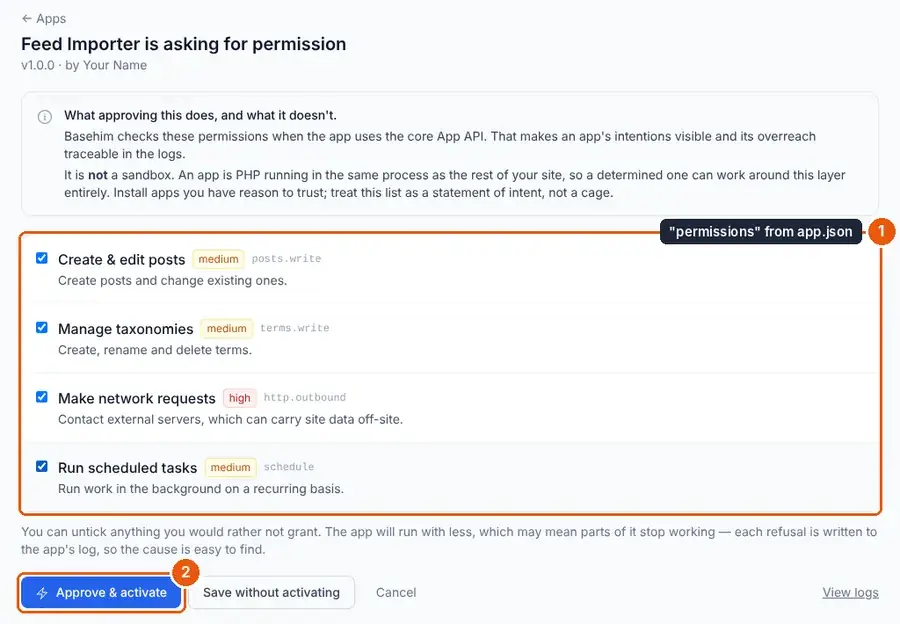
- declare permissions and approve them;
- read your app's log;
- set up a real cron job.
You need: a Basehim site you can add files to, and the URL of any RSS feed. Your own site's /feed works, as long as it's a different site from the one running the importer.
Step 1: The manifest, with permissions
{
  "name": "Feed Importer",
  "slug": "feed-importer",
  "version": "1.0.0",
  "description": "Checks an RSS feed every hour and saves new items as draft posts.",
  "developer": { "name": "Your Name", "url": "https://example.com" },
  "namespace": "Tutorial\\FeedImporter",
  "permissions": ["posts.write", "terms.write", "http.outbound", "schedule"],
  "requires": { "php": ">=8.1", "basehim": ">=1.2.51" }
}
This app contacts another server and writes posts, so it declares what it needs:
| Permission | Why |
|---|---|
posts.write | Create the draft posts. A write includes the matching read |
terms.write | Create the "Imported" category |
http.outbound | Fetch the feed |
schedule | Run every hour |
When the app is activated, the site owner sees this list and approves it. From then on, a call outside the list returns an empty result and is logged. See App permissions.
Step 2: Register the task
src/App.php:
<?php

namespace Tutorial\FeedImporter;

use App\Core\Request;
use App\Core\Response;

class App extends \App\Core\App
{
    public function boot(): void
    {
        // Registered on every request, so the scheduler always knows what "import" means.
        $this->schedule()->hourly('import', [$this, 'import']);

        $this->addAdminMenu(['url' => '/admin/feed-importer', 'label' => 'Feed importer', 'icon' => 'rss']);
        $this->adminGet('/feed-importer', [$this, 'screen']);
        $this->adminPost('/feed-importer', [$this, 'save']);
    }
Registering a task on every request is intended: it's cheap, and the handler itself is never stored in the database. Basehim remembers when import last ran and calls it again once an hour has passed. Other intervals: daily(), weekly(), everyMinutes(15, …) and every($seconds, …).
Step 3: The task itself
    /** The scheduled task. Never echoes; logs what it did. */
    public function import(): void
    {
        $url = (string) $this->getSetting('feed_url', '');
        if ($url === '') {
            return;
        }

        $res = $this->api()->http()->timeout(10)->get($url);
        if (!$res['ok']) {
            $this->log('Could not fetch the feed', ['url' => $url, 'status' => $res['status'], 'error' => $res['error']], 'warning');
            return;
        }

        $xml = simplexml_load_string($res['body'], 'SimpleXMLElement', LIBXML_NONET | LIBXML_NOCDATA | LIBXML_NOERROR | LIBXML_NOWARNING);
        if ($xml === false || !isset($xml->channel->item)) {
            $this->log('The feed is not RSS', ['url' => $url], 'warning');
            return;
        }

        $category = $this->api()->terms()->firstOrCreate('category', 'Imported');
        $seen     = (array) $this->getSetting('seen', []);
        $added    = 0;

        foreach ($xml->channel->item as $item) {
            $guid = trim((string) ($item->guid ?: $item->link));
            if ($guid === '' || in_array($guid, $seen, true)) {
                continue;
            }
            $link    = trim((string) $item->link);
            $summary = trim(html_entity_decode(strip_tags((string) $item->description), ENT_QUOTES | ENT_HTML5));

            $html = $summary !== '' ? '<p>' . htmlspecialchars($summary) . '</p>' : '';
            if (preg_match('#^https?://#i', $link)) {             // never a javascript: link
                $html .= '<p><a href="' . htmlspecialchars($link) . '">Read the original</a></p>';
            }

            $id = $this->api()->posts()->create([
                'title'    => trim((string) $item->title) ?: 'Untitled',
                'content'  => $html,
                'status'   => 'draft',                       // an editor reviews before publishing
                'term_ids' => $category ? [(int) $category['id']] : [],
            ]);
            if ($id > 0) {
                $seen[] = $guid;
                $added++;
            }
        }

        $this->setSetting('seen', array_slice($seen, -200));   // remember the last 200 items
        $this->setSetting('last_run', bh_now());
        $this->log("Imported {$added} item(s)", ['url' => $url]);
    }
Things worth noticing:
http()never throws. It returnsok,status,bodyanderror, with a 10-second timeout here, so a slow feed can't hang the task.LIBXML_NONETstops the XML parser from fetching anything else from the network.NOERRORandNOWARNINGkeep a malformed feed from printing warnings.- The feed is untrusted input. The summary is reduced to plain text and escaped. The link must be
http(s). The title is stored as plain text, and themes escape it when they print it. - No one is signed in when a task runs from the scheduler. So the post author defaults to user 1, and the HTML is filtered as for an author. For this app that filter is a welcome second line of defence.
firstOrCreate()is safe even if two runs overlap.- Duplicates are skipped by remembering the last 200 item IDs in the app's settings.
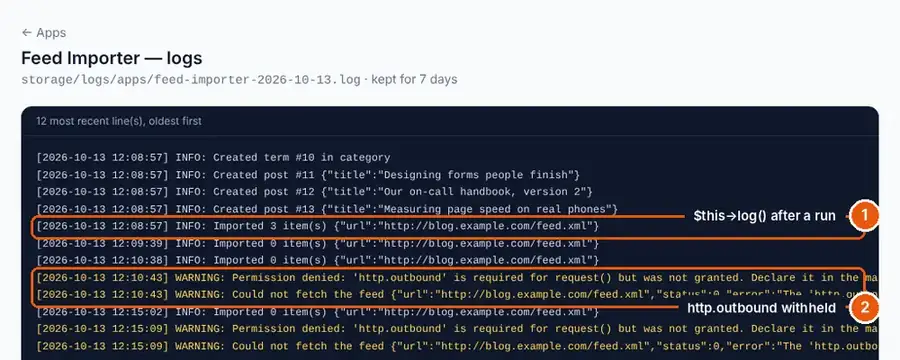
- Logging goes to the app's own log, which you can read under Apps → Logs. Warnings also reach the core log.
Step 4: A screen to set the feed
    public function screen(Request $request): Response
    {
        return Response::html($this->adminView('screen', 'Feed importer', [
            'feedUrl' => (string) $this->getSetting('feed_url', ''),
            'lastRun' => (string) $this->getSetting('last_run', ''),
            'csrf'    => $this->session()->csrfToken(),
        ]));
    }

    public function save(Request $request): Response
    {
        if (!$this->session()->verifyCsrf((string) $request->input('_csrf'))) {
            return $this->back('error', 'Your session expired. Reload the page and try again.');
        }
        $url = trim((string) $request->input('feed_url', ''));
        if ($url !== '' && !preg_match('#^https?://\S+$#i', $url)) {
            return $this->back('error', 'Enter a full http:// or https:// address.');
        }
        $this->setSetting('feed_url', $url);

        if ($request->input('run_now') === '1') {
            $result = $this->schedule()->runNow('import');
            return $this->back(!empty($result['ok']) ? 'success' : 'error',
                !empty($result['ok']) ? 'Saved, and the feed was checked.' : 'Saved, but the import failed: ' . ($result['error'] ?? 'see the app log'));
        }
        return $this->back('success', 'Saved. The feed is checked about once an hour.');
    }

    private function back(string $type, string $message): Response
    {
        $this->session()->flash('_flash', ['type' => $type, 'message' => $message]);
        return Response::redirect((defined('BASEHIM_BASE') ? BASEHIM_BASE : '') . '/admin/feed-importer');
    }
}
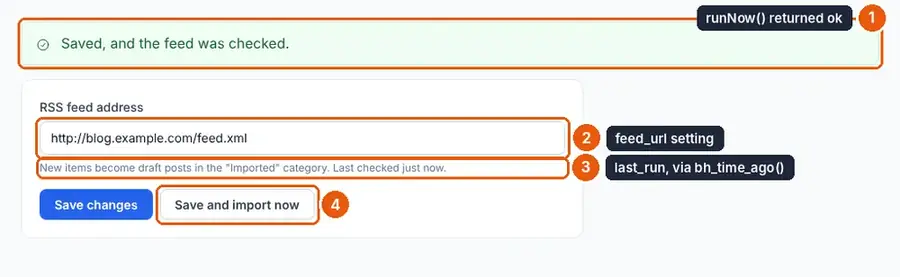
runNow('import') runs the task immediately and returns ['ok' => true|false, …]. It's handy for a Save and import now button and for testing.
views/screen.php:
<form method="post" action="<?= $base ?>/admin/feed-importer" class="bh-card bh-card--pad" style="max-width: 640px">
    <input type="hidden" name="_csrf" value="<?= htmlspecialchars($csrf) ?>">
    <label class="bh-label" for="fi-url">RSS feed address</label>
    <input id="fi-url" name="feed_url" type="url" class="bh-input" value="<?= htmlspecialchars($feedUrl) ?>" placeholder="https://example.com/feed">
    <p class="bh-help">
        New items become draft posts in the "Imported" category.
        <?= $lastRun !== '' ? 'Last checked ' . bh_time_ago($lastRun) . '.' : 'Not checked yet.' ?>
    </p>
    <p style="margin-top: 1rem; display: flex; gap: .5rem">
        <button type="submit" class="bh-btn bh-btn--primary">Save changes</button>
        <button type="submit" name="run_now" value="1" class="bh-btn bh-btn--secondary">Save and import now</button>
    </p>
</form>
bh_time_ago() turns the stored UTC time into "5 minutes ago".
Step 5: Activate, approve and run
- Under Apps, click Activate on Feed Importer. Because it declares permissions, a consent screen lists them. Approve them all.
- Open Feed importer, paste a feed URL and click Save and import now. You should see "Saved, and the feed was checked."
- Open Posts and filter by drafts: the items are there, in the Imported category.
- Click Save and import now again. The log (Apps → Logs) says "Imported 0 item(s)", because nothing was new.
To see permissions at work, open the app's consent screen again at /admin/apps/feed-importer/consent, untick http.outbound and click Save without activating (the app stays active; only its permissions change). Click Save and import now: the log shows "Permission denied: 'http.outbound' is required…" and "Could not fetch the feed". Nothing is imported, and no page breaks. Tick it again afterwards.
Step 6: Make it punctual
By default, due tasks run after a page has been sent to a visitor, so nobody waits. On a site with no visitors at 3 am, nothing runs at 3 am. For a dependable hourly import, add a real cron job.
First get your site's cron URL. It needs an administrator's API key with settings:read:
curl -s https://your-site.com/api/v1/schedule -H "Authorization: Bearer basehim_your_key"The answer lists your tasks, with their last and next run times, and includes meta.cron_url. Add it to your host's cron jobs to run every minute:
* * * * * curl -s "https://your-site.com/api/v1/schedule/run?token=YOUR_TOKEN" > /dev/nullEach call runs whatever is due, at most five tasks, one sweep at a time. A failing task is logged and counted, and is tried again at its next interval rather than on every request.
Ideas to extend it
- Several feeds: store a list in
setSetting('feeds', [...])and loop over it. - Publish straight away from trusted feeds: set
'status' => 'published'and give the site's default authorpublish_posts. - Download each item's image with
$this->api()->http()->get(), save it to a temporary file, upload it with$this->api()->media()->uploadFromPath(), and setfeatured_media_id. That needs themedia.writepermission. - For feeds with thousands of items, keep the seen IDs in your own table instead of settings.
Reference: The App API and App permissions.
Leave a comment