
Build a theme from scratch
 Asif Mughal
12 min read
Asif Mughal
12 min read
In this tutorial you'll build Notebook, a clean, readable theme. Along the way you'll use everything a real theme needs:
- a manifest;
- shared header and footer partials;
- a template for each kind of page;
- post cards and pagination that keep search terms;
- menus and a sidebar widget area;
- core's comment form and author box;
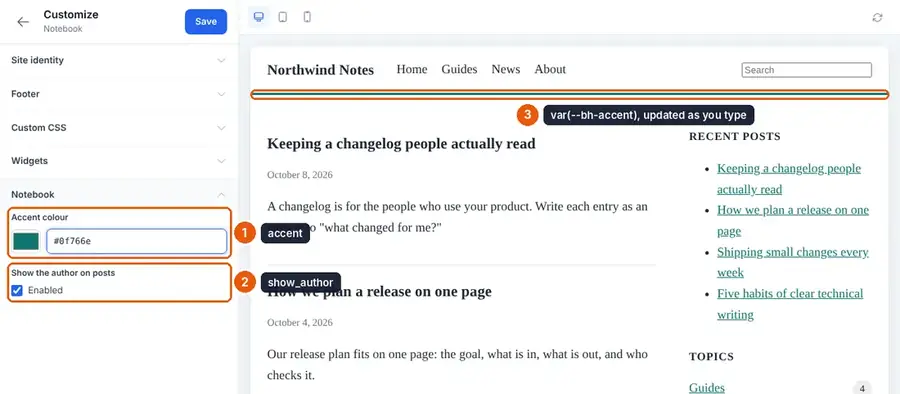
- a Customizer colour that updates live.
There's no build step: it's PHP templates and one stylesheet.
You need: a Basehim site you can add files to, with a few published posts, and an administrator account.
Step 1: The folder and the manifest
content/themes/notebook/
├── theme.json
├── assets/
│   └── notebook.css
└── templates/
    ├── index.php  single.php  page.php  archive.php  search.php  404.php
    └── partials/
├── header.php footer.php card.php pagination.phptheme.json:
{
  "name": "Notebook",
  "slug": "notebook",
  "version": "1.0.0",
  "author": "Your Name",
  "description": "A plain, readable theme for writing.",
  "requires": { "basehim": ">=1.2.45" },

  "menu_locations": {
    "primary": "Main menu",
    "footer": "Footer links"
  },

  "widget_areas": {
    "sidebar": {
      "name": "Sidebar",
      "description": "Beside posts and pages.",
      "before_widget": "<section class=\"nb-widget\">",
      "after_widget": "</section>",
      "before_title": "<h2 class=\"nb-widget__title\">",
      "after_title": "</h2>"
    }
  },

  "customizer": {
    "notebook": {
      "label": "Notebook",
      "options": {
        "accent":      { "type": "color", "label": "Accent colour", "default": "#b45309" },
        "show_author": { "type": "toggle", "label": "Show the author on posts", "default": true }
      }
    }
  }
}
This declares two menu locations, one widget area with wrapper markup (so widgets pick up your styles), and two Customizer options.
Step 2: The header and footer partials
Every template starts with $partial('header') and ends with $partial('footer').
templates/partials/header.php:
<!DOCTYPE html>
<html lang="en">
<head>
    <meta charset="UTF-8">
    <meta name="viewport" content="width=device-width, initial-scale=1">
    <title><?= htmlspecialchars($seo['title'] ?? $site_title) ?></title>
    <?php if (!empty($favicon_url)): ?>
        <link rel="icon" href="<?= htmlspecialchars($favicon_url) ?>">
    <?php endif; ?>
    <link rel="stylesheet" href="<?= theme_asset('notebook.css') ?>">
    <?= menu_assets() ?>
    <?= bh_head() ?>
</head>
<body class="<?= bh_body_class('notebook') ?>">
<header class="nb-header">
    <a class="nb-brand" href="<?= $base ?>/">
        <?php if (!empty($logo_url)): ?>
            <img src="<?= htmlspecialchars($logo_url) ?>" alt="<?= htmlspecialchars($site_title) ?>" height="32">
        <?php else: ?>
            <?= htmlspecialchars($site_title) ?>
        <?php endif; ?>
    </a>
    <?= menu_html($primary_menu, ['class' => 'bh-menu nb-menu', 'aria' => 'Primary']) ?>
    <form class="nb-search" action="<?= $base ?>/search" method="get">
        <input type="search" name="q" placeholder="Search" aria-label="Search" value="<?= htmlspecialchars($query ?? '') ?>">
    </form>
</header>
<div class="nb-layout">
<main class="nb-main">templates/partials/footer.php:
</main>
<?php if (has_widget_area('sidebar')): ?>
    <aside class="nb-sidebar"><?= widget_area('sidebar') ?></aside>
<?php endif; ?>
</div>
<footer class="nb-footer">
    <?= menu_html($footer_menu, ['class' => 'bh-menu nb-menu nb-menu--footer', 'aria' => 'Footer']) ?>
    <p><?= htmlspecialchars($footer_text ?: '© ' . bh_date(bh_now(), 'Y') . ' ' . $site_title) ?></p>
</footer>
<?= bh_footer() ?>
</body>
</html>
Notes on what you just wrote:
bh_head()andbh_footer()are required. They bring in the Customizer's CSS variables, the site's custom CSS, and everything apps add, such as analytics or a consent banner.- No SEO tags. Core adds the description, canonical link, Open Graph, Twitter cards and JSON-LD to every page. The
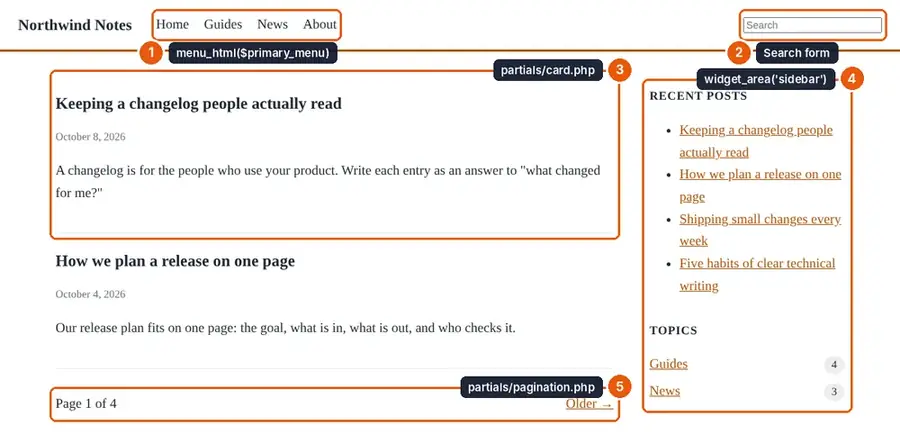
<title>is a fallback that core fills in. $site_title,$logo_url,$primary_menuand the other common variables are passed to every template and partial.menu_html()withbh-menuin its class gets core's menu styles frommenu_assets(): links in a row, with dropdowns for nested items. Your own class (nb-menu) is for anything you want to change.- The sidebar is printed only when it has widgets, so an empty area doesn't leave a gap.
Step 3: A card and pagination
templates/partials/card.php shows one post in a list:
<article class="nb-card">
    <h2><a href="<?= $base . htmlspecialchars(\App\Core\Helpers::postUrl($post)) ?>"><?= htmlspecialchars($post['title']) ?></a></h2>
    <p class="nb-meta"><?= bh_time_tag($post['published_at'] ?? $post['created_at']) ?></p>
    <?php if (!empty($post['excerpt'])): ?>
        <p><?= htmlspecialchars($post['excerpt']) ?></p>
    <?php endif; ?>
</article>Helpers::postUrl()follows the site's permalink setting. Never build post URLs by hand.bh_time_tag()prints the date in the site's timezone, inside a<time>element. Times are stored in UTC, sodate()would show the wrong day for much of the world.
templates/partials/pagination.php reads $meta (there is no $pagination variable) and keeps the query string, so page 2 of a search is still that search:
<?php
$current = max(1, (int) ($meta['page'] ?? 1));
$last    = max(1, (int) ($meta['last_page'] ?? 1));
if ($last < 2) return;

// Keep the rest of the query string (the search term on /search?q=…).
$path = strtok((string) ($_SERVER['REQUEST_URI'] ?? '/'), '?');
$url  = function (int $n) use ($path): string {
    $q = $_GET;
    if ($n <= 1) unset($q['page']); else $q['page'] = $n;
    $s = http_build_query($q);
    return htmlspecialchars($path . ($s !== '' ? '?' . $s : ''), ENT_QUOTES);
};
?>
<nav class="nb-pager" aria-label="Pages">
    <?php if ($current > 1): ?><a href="<?= $url($current - 1) ?>" rel="prev">← Newer</a><?php endif; ?>
    <span>Page <?= $current ?> of <?= $last ?></span>
    <?php if ($current < $last): ?><a href="<?= $url($current + 1) ?>" rel="next">Older →</a><?php endif; ?>
</nav>
Step 4: The list templates
templates/index.php, used for the home page and its later pages:
<?php $partial('header'); ?>

<?php if (empty($posts)): ?>
    <p>Nothing published yet.</p>
<?php endif; ?>

<?php foreach ($posts as $post): ?>
    <?php $partial('card', ['post' => $post]); ?>
<?php endforeach; ?>

<?php $partial('pagination'); ?>
<?php $partial('footer'); ?>templates/archive.php, used for categories, tags and authors:
<?php $partial('header'); ?>

<h1 class="nb-title">
    <?php if (($archive_type ?? '') === 'author'): ?>
        Posts by <?= htmlspecialchars($author['display_name'] ?? '') ?>
    <?php else: ?>
        <?= htmlspecialchars($term['name'] ?? $title ?? 'Archive') ?>
    <?php endif; ?>
</h1>
<?php if (!empty($term['description'])): ?>
    <p class="nb-lead"><?= htmlspecialchars($term['description']) ?></p>
<?php endif; ?>

<?php foreach ($posts as $post): ?>
    <?php $partial('card', ['post' => $post]); ?>
<?php endforeach; ?>

<?php $partial('pagination'); ?>
<?php $partial('footer'); ?>templates/search.php:
<?php $partial('header'); ?>

<h1 class="nb-title">Search: <?= htmlspecialchars($query ?? '') ?></h1>
<p class="nb-lead"><?= (int) ($meta['total'] ?? 0) ?> result(s)</p>

<?php foreach ($posts as $post): ?>
    <?php $partial('card', ['post' => $post]); ?>
<?php endforeach; ?>

<?php $partial('pagination'); ?>
<?php $partial('footer'); ?>
Step 5: Posts, pages and 404
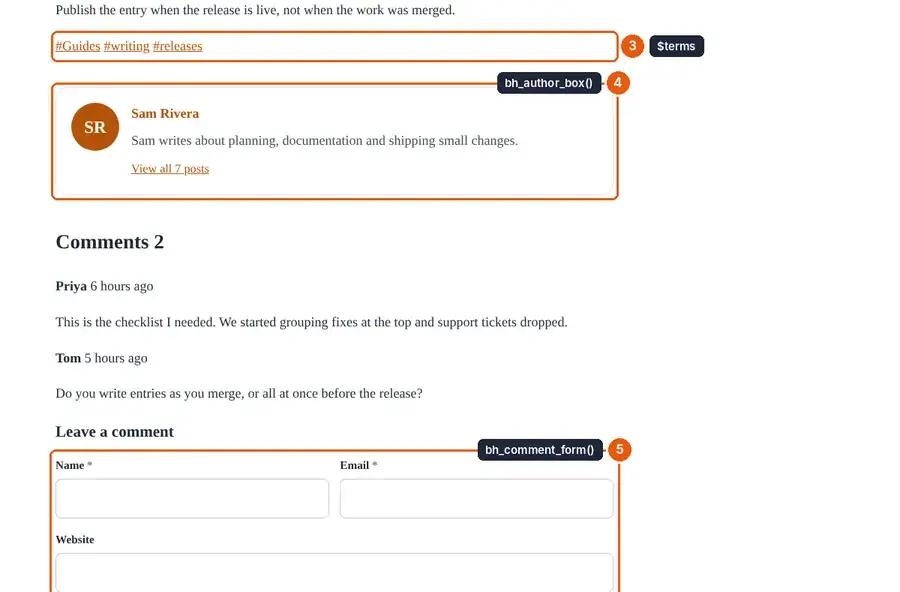
templates/single.php shows one post, its categories and tags, the author box and comments:
<?php $partial('header'); ?>

<article class="nb-article">
    <h1 class="nb-title"><?= htmlspecialchars($post['title']) ?></h1>
    <p class="nb-meta">
        <?= bh_time_tag($post['published_at'] ?? $post['created_at']) ?>
        <?php if (bh_theme_option('show_author', true) && !empty($post['author_name'])): ?>
            · <?= htmlspecialchars($post['author_name']) ?>
        <?php endif; ?>
    </p>

    <?= bh_post_image($post, 'large', ['class' => 'nb-hero', 'loading' => 'eager']) ?>

    <div class="nb-content"><?= $post['content'] ?></div>

    <?php if (!empty($terms)): ?>
        <p class="nb-terms">
            <?php foreach ($terms as $t): ?>
                <?php $prefix = $t['taxonomy_slug'] === 'tag' ? '/tag/' : '/category/'; ?>
                <a href="<?= htmlspecialchars(link_to($prefix . $t['slug'])) ?>">#<?= htmlspecialchars($t['name']) ?></a>
            <?php endforeach; ?>
        </p>
    <?php endif; ?>

    <?= bh_author_box($post) ?>
</article>

<section id="comments" class="nb-comments">
    <h2>Comments <span data-bh-comment-count="<?= (int) $post['id'] ?>"><?= (int) $comments_count ?></span></h2>
    <?php foreach ($comments as $c): ?>
        <div class="nb-comment" id="comment-<?= (int) $c['id'] ?>">
            <strong><?= htmlspecialchars($c['author_name']) ?></strong>
            <?= bh_time_tag($c['created_at'], null, true) ?>
            <p><?= nl2br(htmlspecialchars($c['content'])) ?></p>
        </div>
    <?php endforeach; ?>
    <?= bh_comment_form($post) ?>
</section>

<?php $partial('footer'); ?>$post['content']is printed without escaping. Core has already rendered it to HTML, whether it was written as blocks, Markdown or HTML. Everything else is escaped.bh_post_image()prints a responsive featured image withsrcset, width and height, or nothing when the post has none.bh_author_box()andbh_comment_form()are core's. They handle avatars, the CSRF token, the spam honeypot, replies and signed-in members. When comments are off, the form prints "Comments are closed."bh_theme_option('show_author', true)reads your Customizer toggle. Pass the same default as intheme.json.
templates/page.php:
<?php $partial('header'); ?>

<article class="nb-article">
    <h1 class="nb-title"><?= htmlspecialchars($post['title']) ?></h1>
    <div class="nb-content"><?= $post['content'] ?></div>
</article>

<?php $partial('footer'); ?>templates/404.php. Don't skip it: any missing template falls back to this one.
<?php $partial('header'); ?>

<h1 class="nb-title">Not found</h1>
<p>That page doesn't exist. Try the <a href="<?= $base ?>/search">search</a>.</p>

<?php $partial('footer'); ?>
Step 6: The stylesheet
assets/notebook.css. The first rule connects the Customizer: the accent option arrives as the CSS variable --bh-accent, printed by bh_head().
:root {
    --nb-accent: var(--bh-accent, #b45309);   /* Customizer option "accent" */
    --nb-text: #1f2937;
    --nb-muted: #6b7280;
}
* { box-sizing: border-box; }
body { margin: 0; color: var(--nb-text); font: 18px/1.65 Georgia, "Times New Roman", serif; }
a { color: var(--nb-accent); }

.nb-header { display: flex; flex-wrap: wrap; gap: 1rem 2rem; align-items: center;
             padding: 1rem 1.5rem; border-bottom: 3px solid var(--nb-accent); }
.nb-brand { font-weight: bold; font-size: 1.3rem; color: inherit; text-decoration: none; }
.bh-menu.nb-menu { gap: 1.25rem; }
.nb-menu a { text-decoration: none; }
.nb-menu--footer { justify-content: center; }
.nb-search { margin-left: auto; }

.nb-layout { display: grid; grid-template-columns: minmax(0, 1fr) 260px; gap: 3rem;
             max-width: 1100px; margin: 0 auto; padding: 2rem 1.5rem; }
.nb-layout:not(:has(.nb-sidebar)) { grid-template-columns: minmax(0, 46rem); justify-content: center; }
@media (max-width: 860px) { .nb-layout { grid-template-columns: 1fr; } .nb-sidebar { display: none; } }

.nb-title { line-height: 1.2; margin: 0 0 .5rem; }
.nb-meta, .nb-lead { color: var(--nb-muted); font-size: .9rem; }
.nb-card { padding: 1.25rem 0; border-bottom: 1px solid #e5e7eb; }
.nb-card h2 { margin: 0; font-size: 1.35rem; }
.nb-card h2 a { color: inherit; text-decoration: none; }
.nb-hero { width: 100%; height: auto; border-radius: 6px; }
.nb-content img { max-width: 100%; height: auto; }
.nb-content pre { overflow-x: auto; padding: 1rem; background: #f3f4f6; border-radius: 6px; }
.nb-pager { display: flex; justify-content: space-between; margin: 2rem 0; }
.nb-widget { margin-bottom: 2rem; }
.nb-widget__title { font-size: 1rem; text-transform: uppercase; letter-spacing: .05em; }
.nb-footer { padding: 2rem 1.5rem; text-align: center; color: var(--nb-muted); border-top: 1px solid #e5e7eb; }
Because the colour is a CSS variable, the Customizer's preview updates it instantly, with no reload.
Step 7: Activate and test
- Appearance → Themes: activate Notebook.
- Appearance → Menus: create a menu and assign it to Main menu.
- Appearance → Widgets: add a widget or two to Sidebar. The layout grows a second column.
- Appearance → Customize: change Accent colour and watch the header line and links change in the preview. Toggle Show the author on posts.
Then visit each kind of page:
- the home page, and
?page=2if you have more posts than fit on one page; - a post and a page;
- a category and an author archive;
- a search with results, and one without;
- a made-up URL (your 404).
View the source of a post. There's one set of SEO tags under <!-- SEO (Basehim) -->, which your theme never printed.
Finally, change the timezone under Settings → General. Every date on the site should move with it.
Step 8: Package it
Zip the notebook folder so the archive contains notebook/theme.json. Install it on any site under Appearance → Themes → Upload.
Where to go from here
- Every variable and helper: Theme reference.
- More Customizer option types, your own widgets and
boot.phpfilters: Customizer options, menus and widgets. - Per-page SEO changes and responsive images: SEO, dates and images.
- Need behaviour, such as a newsletter form? Ship a small app alongside the theme: Build your first app.
Leave a comment