
Give your app an MCP tool for AI agents
 Asif Mughal
5 min read
Asif Mughal
5 min read
Every Basehim site has an MCP server, and AI assistants connected to it can use core's tools: search posts, draft content, moderate comments. In this tutorial you'll add a tool of your own, so an assistant can answer "Which posts did readers find most helpful?" from your app's data.
You'll continue the Helpful Votes app from Add a "Was this helpful?" widget with AJAX. The same steps work for any app.
You'll learn to:
- add a scope for your app;
- decide who may grant that scope;
- describe a tool with a JSON Schema;
- answer calls to the tool;
- test it with an API key.
How app tools work
An MCP tool has a name, a description, an input schema and a handler. Basehim gives apps four filters:
| Filter | You provide |
|---|---|
api.scopes | Your scope and its label, so it can be ticked on API keys |
mcp.scopes | Your scope again, so OAuth clients (assistants) can request it |
mcp.scope_capabilities | Which capability a user needs to grant your scope when approving an assistant |
mcp.tools | The tool definitions |
mcp.call.{tool} | The code that runs when the tool is called |
A tool is listed only for tokens that hold its scope. Core's tool names always win a clash, so pick a distinctive name.
Step 1: Add the scope
In boot(), after the existing registrations, call a new method:
        // AI agents: an MCP tool that reads the same report.
        $this->registerMcpTool();
And add it to the class:
    private function registerMcpTool(): void
    {
        // A scope of our own, offered on API keys and to OAuth clients...
        $this->addFilter('api.scopes', fn(array $s) => $s + ['helpful:read' => 'Read helpful-vote totals']);
        $this->addFilter('mcp.scopes', fn(array $s) => [...$s, 'helpful:read']);
        // ...and granted at OAuth consent to anyone who can edit posts (default: administrators only).
        $this->addFilter('mcp.scope_capabilities', fn(array $m) => $m + ['helpful:read' => 'edit_posts']);
Name scopes {something}:read or {something}:write, and keep read and write apart. An assistant that only needs to look should never be able to change anything.
Without the mcp.scope_capabilities line, only administrators could grant helpful:read to an assistant. With it, authors and editors can too, because they have edit_posts.
Step 2: Describe the tool
        // The tool, listed in tools/list for tokens that hold the scope.
        $this->addFilter('mcp.tools', function (array $tools) {
            $tools[] = [
                'name'        => 'helpful_votes_report',
                'description' => 'Posts with the most "Was this helpful?" votes, with yes and no counts.',
                'inputSchema' => [
                    'type'       => 'object',
                    'properties' => [
                        'limit' => ['type' => 'integer', 'minimum' => 1, 'maximum' => 100,
                                    'description' => 'How many posts to return (default 10).'],
                    ],
                    'additionalProperties' => false,
                ],
                '_scope'      => 'helpful:read',
            ];
            return $tools;
        });
The description is what the assistant reads when it decides whether to use your tool, so write it for that reader. Say what the tool returns, not how it works. The inputSchema is standard JSON Schema; describe every property.
Step 3: Answer calls
        // What tools/call runs. Return an array (sent as JSON) or a string.
        $this->addFilter('mcp.call.helpful_votes_report', function ($result, array $args) {
            $limit = max(1, min(100, (int) ($args['limit'] ?? 10)));
            return ['posts' => $this->totals($limit)];
        }, 10, 2);
}- The filter receives
nulland the tool's arguments. The10, 2asks for both. - Return an array (Basehim encodes it as JSON) or a string.
- Validate the arguments yourself. The schema tells the assistant what to send, but it isn't enforced for you. Here the limit is clamped to 1–100.
- If the handler throws, the assistant gets a tool error with the message. Throw messages you're happy for it to read.
totals() is the same method the admin report uses: one query, two front doors. Make sure it returns plain types, such as integers for counts, so the assistant gets clean JSON.
Step 4: Test with an API key
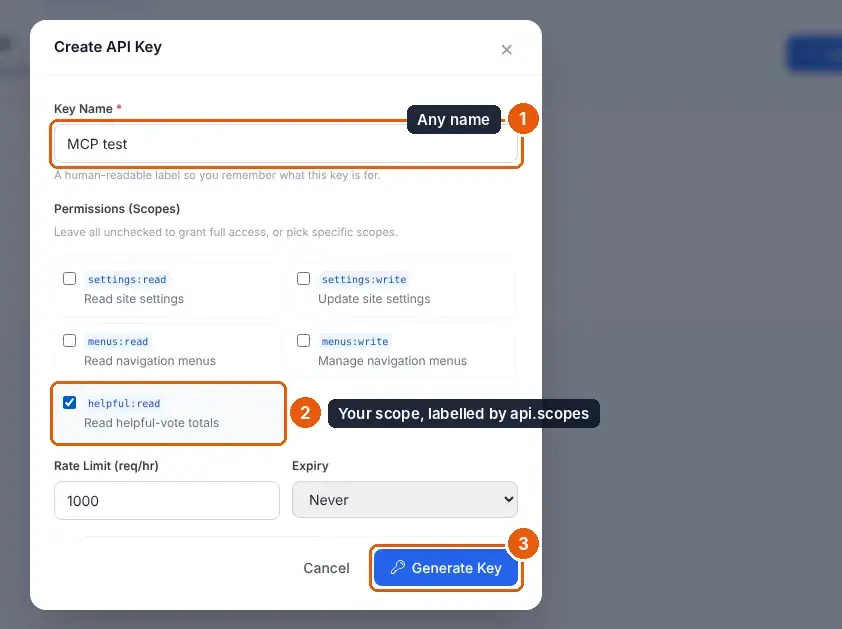
- Under API → Keys, create a key named "MCP test" and tick Read helpful-vote totals (your label from
api.scopes).
- List the tools:
KEY=basehim_your_key; SITE=https://your-site.com
curl -s -X POST "$SITE/mcp" -H "Authorization: Bearer $KEY" -H 'Content-Type: application/json' \
  -d '{"jsonrpc":"2.0","id":1,"method":"tools/list"}'
helpful_votes_report is in the list.
- Call it:
curl -s -X POST "$SITE/mcp" -H "Authorization: Bearer $KEY" -H 'Content-Type: application/json' \
  -d '{"jsonrpc":"2.0","id":2,"method":"tools/call","params":{"name":"helpful_votes_report","arguments":{"limit":5}}}'
{"jsonrpc":"2.0","id":2,"result":{"content":[{"type":"text","text":"{\n \"posts\": [\n {\n \"id\": 1,\n \"title\": \"Hello, world!\",\n \"yes\": 2,\n \"no\": 0\n }\n ]\n}"}],"isError":false}}- Now try a key without the scope. The tool isn't in
tools/list, and calling it returnsisError: truewith "This API key is not permitted to use the "helpful_votes_report" tool (missing scope)."
Step 5: Use it from an assistant
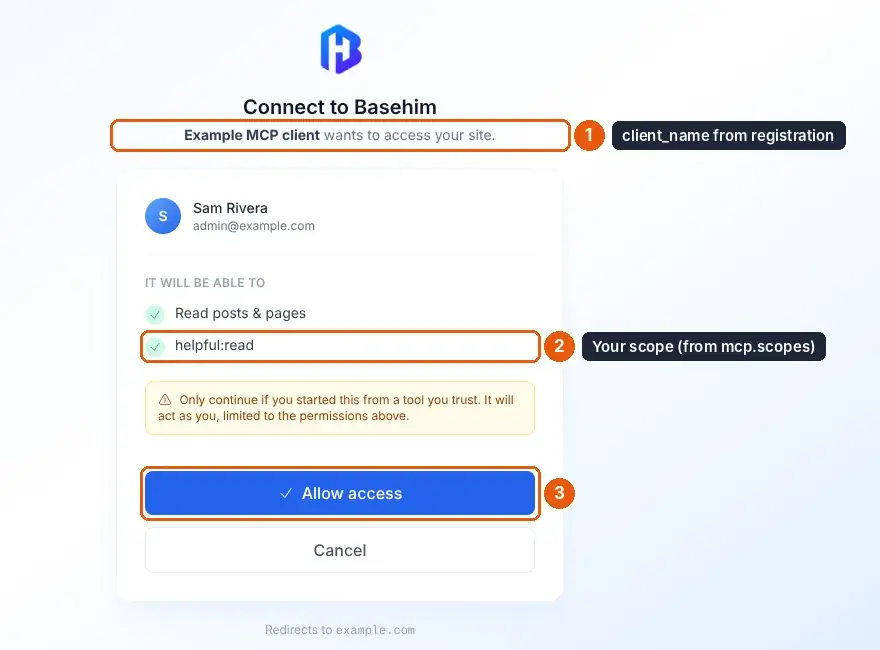
Connect an assistant to your site, as in Connect an AI assistant to your site. If the assistant requests every scope the site offers, the consent screen includes helpful:read. Once you approve, ask it something like:
Which of my posts did readers find least helpful, and what might be missing from them?
The assistant can call helpful_votes_report, then get_post for the weakest posts, and answer from your real data.
Good tool design
- Read-only by default. Write tools need a
:writescope and a careful description of what they change. - Return what the assistant needs to act: ids, titles and URLs, not internal noise.
- Keep results small. Use a limit with a sensible default.
- Decide who may grant the scope, with
mcp.scope_capabilities. In Basehim 1.2.53 and earlier a tool handler isn't told which user the token belongs to ($this->api()->users()->current()isnullthere), so a tool should return only data that everyone able to grant its scope may see.
Reference: MCP and AI agents and Hooks and filters.
Leave a comment