
Developer docs
Start
Build with AI
Themes
Apps
- App development
- App development best practices
- Hooks and filters
- The App API
- Sending email from apps
- Admin bar for apps and themes
- Public routes for apps
- Admin screens, routes and UI components
- Dashboard widgets
- Data tables
- AJAX actions
- Media and uploads for apps
- App permissions
- Content types, blocks and widgets
- Content types, taxonomies and custom fields
- Search
- When an app fails: fault isolation and recovery
API and AI agents
Security and contributing
Content types, taxonomies and custom fields
Since Basehim 1.2.94 an app can add its own kinds of content, such as events, products or recipes, along with the taxonomies that group them and the extra fields each item carries. Core gives them everything posts have: an admin list and editor, public pages, the sitemap, site search, the REST API and theme helpers. The app only declares them.
public function boot(): void
{
    $this->registerPostType('event', [
        'label'      => 'Events',
        'singular'   => 'Event',
        'icon'       => 'calendar',
        'supports'   => ['title', 'content', 'excerpt', 'thumbnail'],
        'taxonomies' => ['category'],          // core's, shared with posts
    ]);
    $this->registerTaxonomy('event-type', [
        'label' => 'Event types', 'singular' => 'Event type',
        'hierarchical' => true, 'post_types' => ['event'],
    ]);
    $this->registerFields('event', [
        ['key' => 'starts_at', 'label' => 'Starts', 'type' => 'date', 'required' => true],
        ['key' => 'venue', 'label' => 'Venue', 'type' => 'text', 'maxlength' => 120],
        ['key' => 'seats', 'label' => 'Seats', 'type' => 'number', 'min' => 1, 'default' => 50],
        ['key' => 'online', 'label' => 'Online event', 'type' => 'checkbox'],
        ['key' => 'stream_url', 'label' => 'Stream link', 'type' => 'url', 'show_if' => ['online' => '1']],
    ], ['title' => 'Event details']);
}
That is the whole app side. Events are now at /events/summer-meetup, listed at /events, edited under Events in the admin sidebar, and their fields are a panel in the editor's sidebar.
Registrations are per request, made in boot(). When the app is switched off, its types, taxonomies and fields stop existing, but the content, terms and field values stay in the database. They come back when the app is switched on again.
Content types
registerPostType($key, $args). The key is lower-case letters, digits, - and _, and is stored as the item's type. post and page belong to core.
| Argument | Default | Meaning |
|---|---|---|
label, singular | {Key}s, {Key} | Names in the admin and on archive pages |
description | '' | Shown on the archive page by themes that print it |
icon | document-text | Sidebar icon (a Heroicons name) |
public | true | false: admin only. No URLs, and not in the sitemap, search or REST API |
rewrite | key + s | URL prefix: items at /{rewrite}/{slug}, archive at /{rewrite}. false: no core URLs (the app serves them itself) |
has_archive | true | Whether /{rewrite} lists the published items |
per_page | Settings → Reading | Items per archive page |
supports | all | Editor panels: excerpt, thumbnail (featured image), comments (the Discussion panel, and whether comments are accepted). Title, content, status and slug are always there |
taxonomies | [] | Taxonomies for this type: category, tag, or an app's |
searchable | as public | Whether published items appear in site search |
menu | true | false hides it from the sidebar; a string names the sidebar section |
capability_type | post | Capability family: edit_posts, publish_posts … |
- Prefixes. One of core's own paths (
admin,api,posts,page,category,tag,search…) or another type's prefix is refused. The type then has no URLs, and the reason is inPostTypeRegistry::rejected(). - Apps' own routes win. The type's URLs are tried after apps' own routes and before the page lookup, so an app that already serves
/eventskeeps it. - Pages with the same slug. A page whose slug equals a type's prefix moves to
/page/{slug}, as it does for any route. - Slugs are unique within their type.
Taxonomies
registerTaxonomy($key, $args) groups content the way categories and tags group posts.
| Argument | Default | Meaning |
|---|---|---|
label, singular | Names | |
hierarchical | false | Terms can have parents |
post_types | [] | Types it applies to. A type's own taxonomies list attaches it too |
public | true | Term pages at /{rewrite}/{term} |
rewrite | the key | URL prefix for term pages; false for none |
The taxonomy is stored the first time it is registered, so terms work like categories everywhere: you add them in the admin (under the type's menu) or with api()->terms()->create('event-type', [...]). In the editor, every taxonomy of a type is a panel of checkboxes; category and tag keep their usual panels. Core's category and tag pages also list a type's items when the type uses them.
Custom fields
registerFields($type, $fields, $group) declares a group of fields for an app's type, or for post or page. Each group is one panel in the editor, titled by $group['title'] (default "Fields") and optionally described by description. Registering the same title again replaces the group.
Fields use the same settings schema as frontend widgets: key, label, type, default, required, help, options, min / max / step / maxlength, show_if, capability and private. Types: text, textarea, html, number, checkbox, select, multiselect, radio, url, color, date, terms (with taxonomy and multiple), posts and media.
- Keys are lower-case letters, digits and
_, and unique per type. A key another app has already declared on the same type is refused, so apps can't overwrite each other's data. Keys starting with_are reserved for core. - Saving. The editor form, the editor's draft save and
saveFields()all check values against the schema. An invalid value is not saved and keeps its previous value. The post itself is still saved, and the editor names the fields that need fixing. An empty required field warns on publish but doesn't block it. - Reading goes through the schema too: every declared field is present, of its declared type, with its default when nothing was saved.
- Private fields (
'private' => true) are left out of the theme helpers, the REST API and MCP. The app reads them withfields(). - Storage is the existing post meta table, one row per field (lists are stored as JSON). Moving a post to the trash keeps its fields; deleting it permanently removes them.
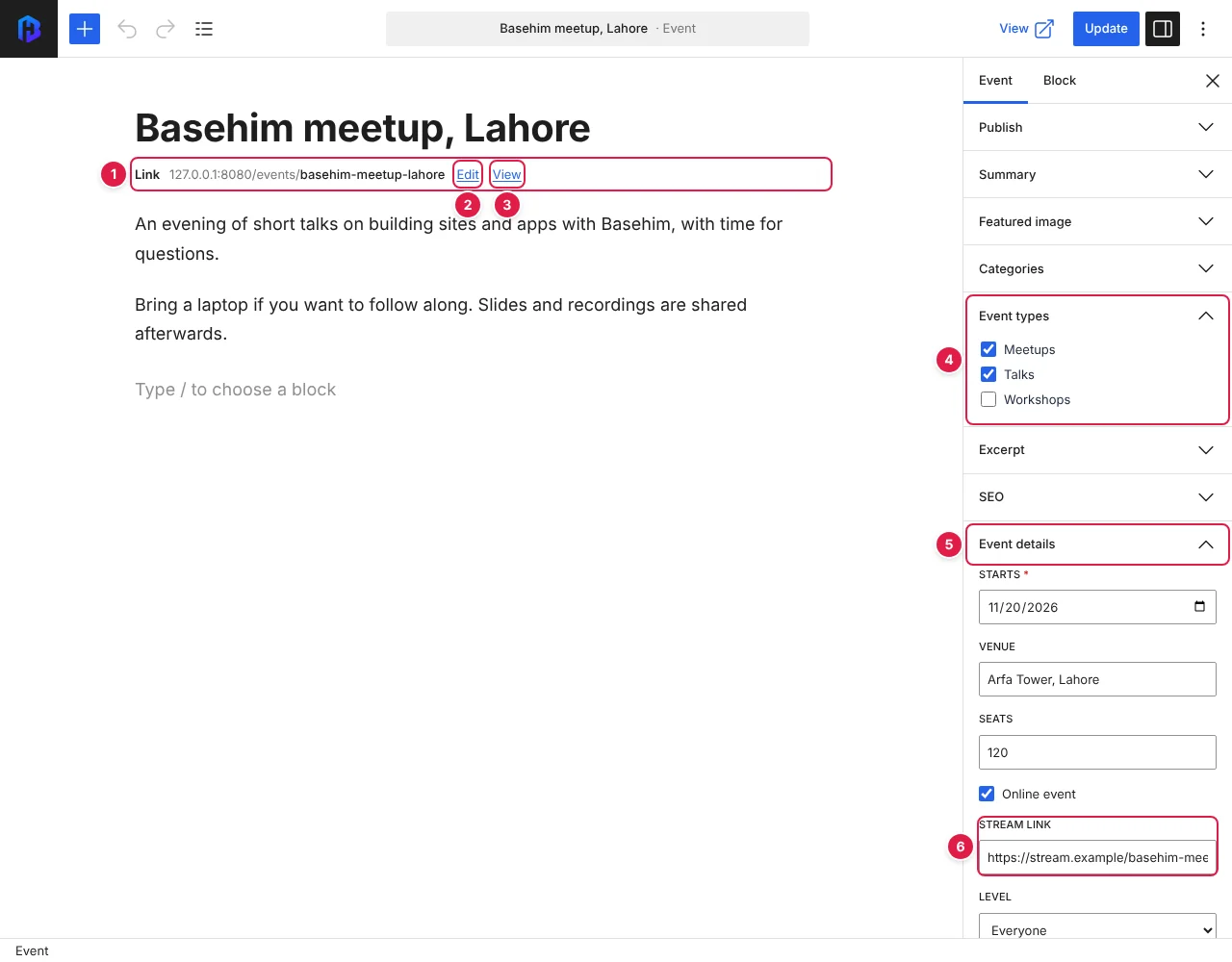
- The permalink line: the event's address,
/events/summer-meetup. - Edit changes the slug in place.
- View opens the published page (Preview for a draft).
- The app's own taxonomy, Event types, as a panel of checkboxes.
- The Event details field group, checked against its schema when saved.
- Stream link appears only while Online event is ticked (
show_if).
In the editor
- Admin list. Each type has its own list, with search, filters, Quick Edit and bulk actions. Its columns follow what the type supports and the taxonomies it uses.
- Panels are the ones the type uses, plus its taxonomies and its field groups. A field with
show_ifappears only when its condition holds. - Permalink line. Under the title, the editor shows the item's address. Edit changes the slug in place (it stays in step with the Slug field in the sidebar), and Preview / View opens the page. This works for posts and pages too.
- Preview saves a draft first when there are unsaved changes, or when the post has never been saved, then opens the preview in a new tab. On a phone, Preview is also in the ⋮ menu.
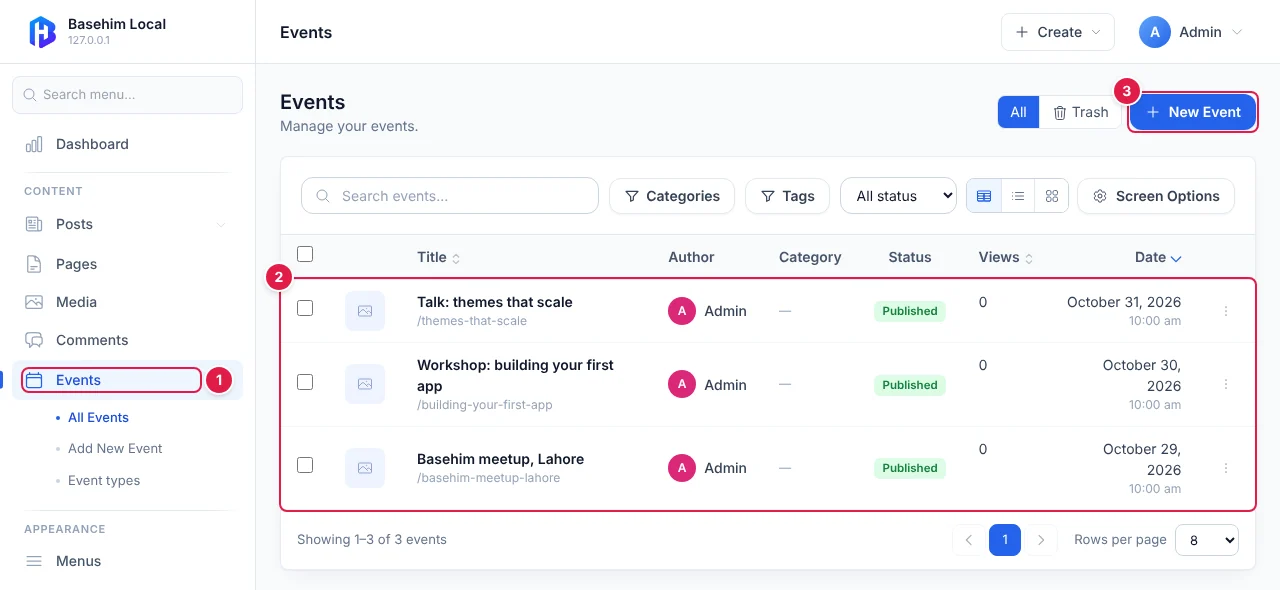
- Events in the sidebar, with its taxonomies (Event types) underneath.
- The list shows events only, with columns for what the type supports and its taxonomies.
- New Event opens the editor for a new item.
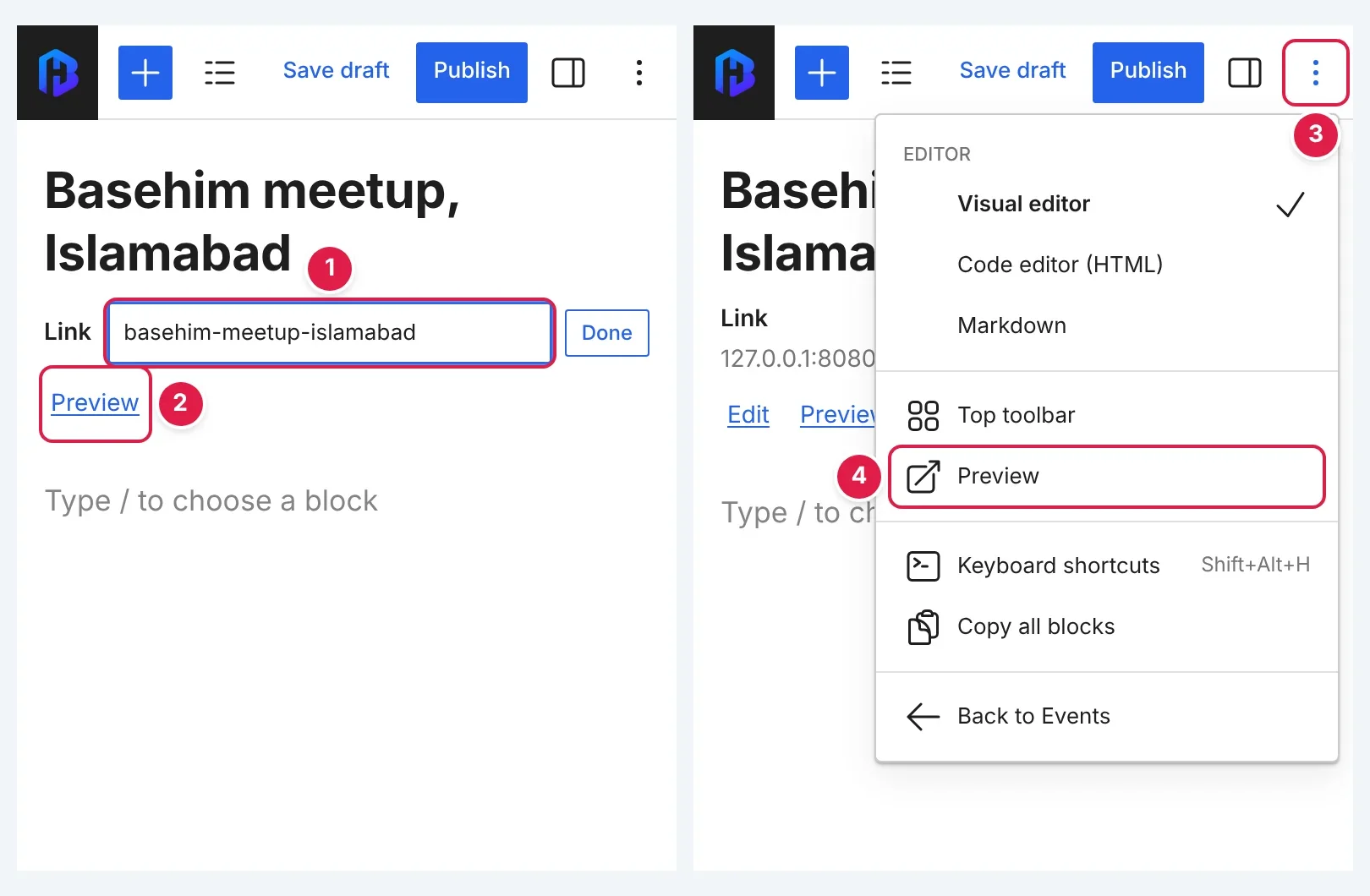
- The slug is edited in place, under the title.
- Preview on the permalink line saves a draft first when needed.
- The ⋮ menu.
- Preview is in the menu too.
Editor scripts can call BasehimEditor.saveDraft() (it resolves with the saved post) and BasehimEditor.preview().
In themes
The most specific template the theme has is used:
| Page | Templates, in order |
|---|---|
| An item | single-{type}.php, then single.php |
| A type's archive | archive-{type}.php, then archive.php |
| A term of an app's taxonomy | taxonomy-{key}.php, then archive.php |
Templates get $post, $fields (the post's public fields) and $post_type (the type's definition). Archives also get $posts, $meta, $archive_type ('post_type' or 'taxonomy') and $taxonomy.
| Helper | Returns |
|---|---|
bh_field('venue', $post, $default) | One field's value. $post defaults to the post being shown |
bh_fields($post) | Every public field, key => value |
bh_field_rows($post) | Label and display text for each field, ready for a details list |
bh_url($post) | The item's address ('' when it has none) |
bh_query(['type' => 'event', 'limit' => 3]) | Published items, newest first, with their fields loaded. Also order, page, author, search, and term => ['taxonomy' => 'event-type', 'slug' => 'workshops'] |
bh_terms($post, 'event-type') | The post's terms in one taxonomy, with name, slug and url |
<?php foreach (bh_query(['type' => 'event', 'limit' => 3]) as $ev): ?>
    <a href="<?= $e(bh_url($ev)) ?>"><?= $e($ev['title']) ?></a>
    <?= $e(bh_date(bh_field('starts_at', $ev))) ?> · <?= $e(bh_field('venue', $ev)) ?>
<?php endforeach; ?>
The default theme prints bh_field_rows() as a details list on item pages.
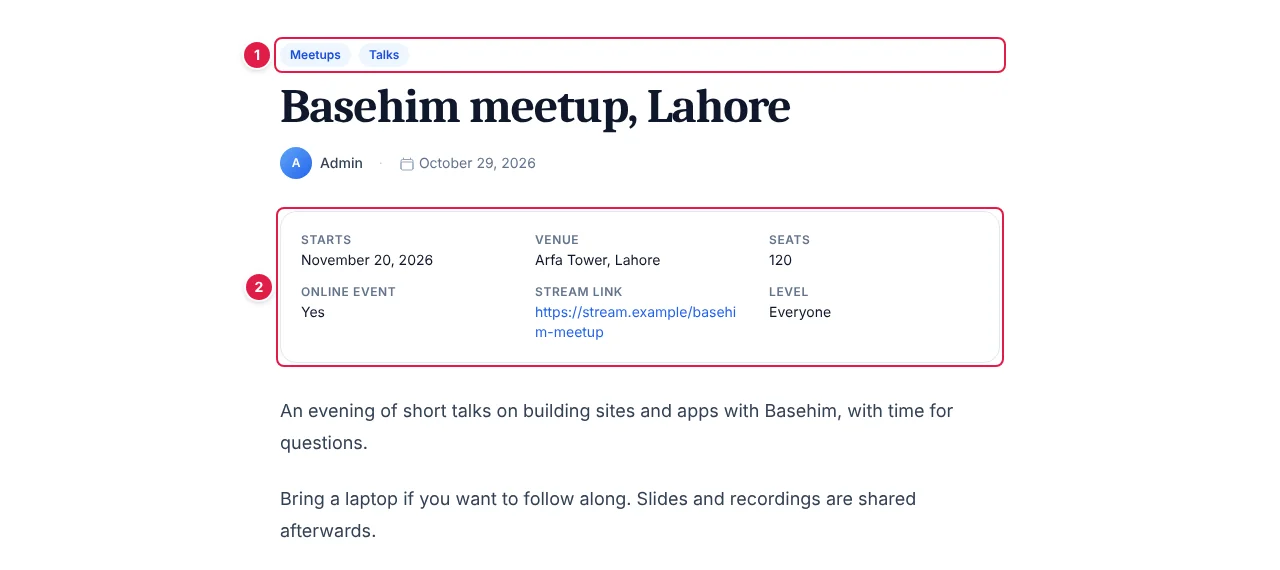
- The event's types, from its Event types taxonomy (
bh_terms()). - The public fields as a details list (
bh_field_rows()).
In apps
$events = $this->api()->content('event');
$id = $events->create(['title' => 'Summer meetup', 'status' => 'published']);
$errors = $events->saveFields($id, ['venue' => 'Hall 2', 'seats' => 80]);   // [] when saved
$values = $events->fields($id);                                            // private fields included
saveFields() writes only the fields it is given; the others keep their values. Reading needs the posts.read permission and writing posts.write.
REST API and MCP
GET /api/v1/content/{type}and/api/v1/content/{type}/{slug}return the published items of a public type, each withurland its publicfields. These endpoints are read-only.GET /api/v1/posts/{slug}and/pages/{slug}includefields.- The MCP tools
get_postandget_pageincludefields.
Limits
- Field values have no revision history; core has no revisions yet.
- Post and media fields are entered as IDs. Media fields have a Choose… button that opens the media library.
- Required fields warn on publish rather than blocking it.
- Field values are not searched by site search.
Related
- App development and App development best practices.
- Search: how content types appear in site search.
- Theme reference, App permissions.
Leave a comment