
Developer docs
Start
Build with AI
Themes
Apps
- App development
- App development best practices
- Hooks and filters
- The App API
- Sending email from apps
- Admin bar for apps and themes
- Public routes for apps
- Admin screens, routes and UI components
- Dashboard widgets
- Data tables
- AJAX actions
- Media and uploads for apps
- App permissions
- Content types, blocks and widgets
- Content types, taxonomies and custom fields
- Search
- When an app fails: fault isolation and recovery
API and AI agents
Security and contributing
Search
BH Search is one search framework for Basehim core and apps. The site's search page, every admin list, the media library, the search API and your app all search the same way, through one shared index, and stay fast with millions of items.
It arrived in Basehim 1.2.92. Before it, each screen searched in its own way, most by reading every row. Now a search costs roughly what it finds, not how much there is. Apps get the same engine: register a source, and your records are indexed in the background, kept current on save, searchable with the same rules and, if you choose, shown on the site's search page.
// In your app's boot(): make your products searchable.
$this->api()->search()->source('products', [
    'label'     => 'Products',
    'public'    => true,                                  // also on the site's search page
    'documents' => fn(int $after, int $limit) => $this->productDocs($after, $limit),
    'document'  => fn(int $id) => $this->productDoc($id),
]);

// After saving one:
$this->api()->search()->touch('products', $id);

// Search your own table, every word in any order, fast at any size:
$params = [];
$where = $this->api()->search()->constrain('products', $q, 'p', $params);
How searching works
The same rules apply everywhere a visitor or an administrator types into a search box:
| Typed | Finds |
|---|---|
digitalocean pricing | Items with both words, anywhere, in any order: "DigitalOcean Droplet Pricing 2026". |
"per-second billing" | The words together, in this order. |
pricing -hetzner | "pricing", but nothing that mentions "hetzner". |
snipaste 2026 | Snipaste_2026-10-27.png: hyphens, underscores, dots and slashes split words. |
%, -- | Nothing. Punctuation alone matches nothing, rather than everything. |
- Capitals and accents don't matter:
cafefinds "Café". Any script works, including Urdu, Arabic and Cyrillic. - A word matches the start of longer words:
pricefinds "prices". Joined names are split too, sodigital oceanfinds "DigitalOcean". - Site search also matches word forms:
pricingfinds "price" and "priced". This is light English suffix stripping on words of six letters or more; other languages are matched as typed. - Short words (
ai,go) and very common words (the,about) work too, although the database index skips them. See Engines.
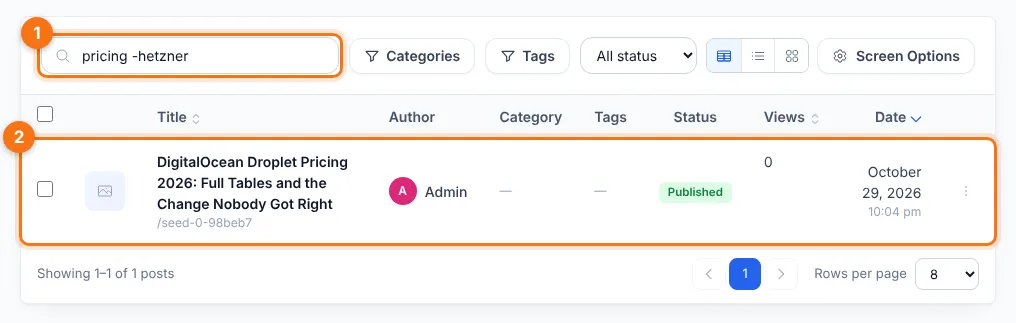
- The search box:
pricing -hetznerfinds posts about pricing and leaves out anything that mentions Hetzner. - The only match, "DigitalOcean Droplet Pricing 2026". The search stays in the address bar, so a reload or Back keeps it.
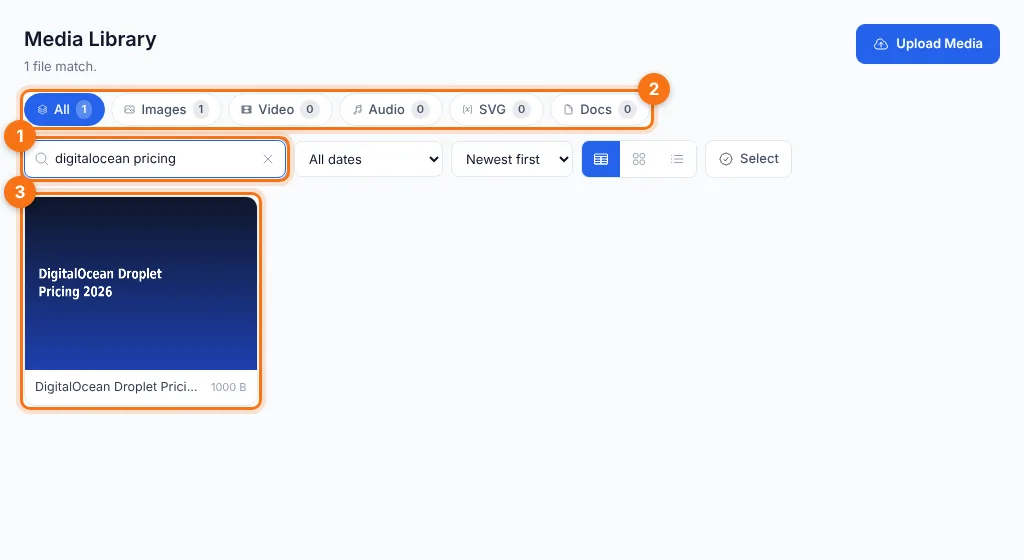
digitalocean pricing: both words, in any order, in the title, file names, alt text, caption or description.- The type counts follow the search: here 1 image.
- The matching file.
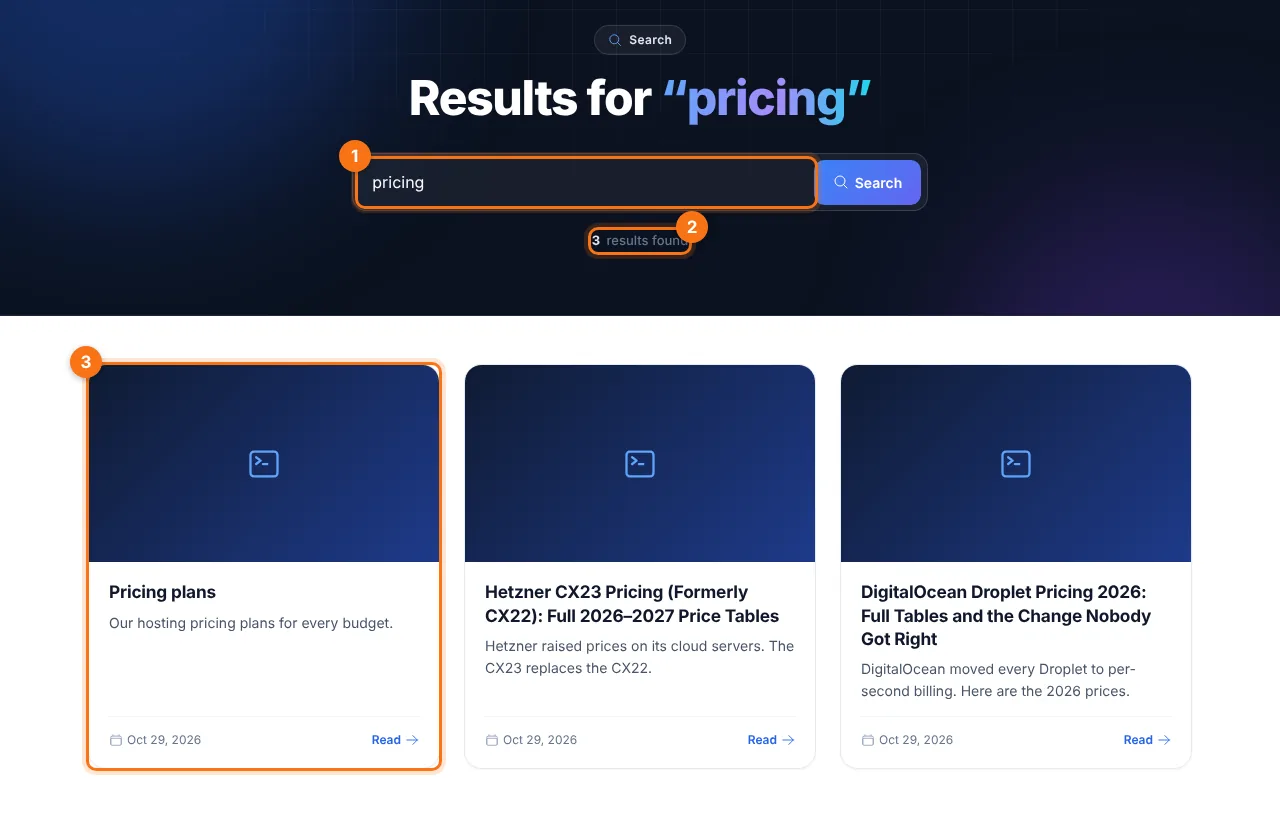
- What the visitor typed.
- How many results, across posts and pages.
- Best match first: the page "Pricing plans", whose title is the closest match, comes before posts.
How it works
 posts ─┐                                    ┌─ admin lists      constrain()
 media ─┤   touch() / remove()  ┌──────────┐ ├─ media library    constrain()
 comments ├────────────────────▶│ search   │─┼─ site search      query()
 users ─┤   background build    │ _index   │ ├─ /api/v1/search
apps ─┘ └──────────┘ └─ apps api()->search()| Part | |
|---|---|
| Sources | What can be searched. Core registers content (posts, pages and app content types), media, comments and users. Apps register their own, named {app-slug}.{name}. |
| The index | One table, search_index, with one FULLTEXT index over each item's title, text and keywords. It is a copy: no existing table is altered. |
| Building | After an update the index is empty. The scheduled task core:search-index fills it a few seconds at a time, and Settings → Search → Build now does it while you watch. Until a source is complete, its searches use its own table, as before, so results are never partial. |
| Keeping current | Core's repositories re-index an item on every save and remove it on delete. A failure never stops the save: the id is kept and retried by the next background run. |
| Rows added outside core | An import or another tool that writes straight into a table is found anyway: searches also check rows newer than the newest indexed one (a primary-key range, so it costs nothing when there are none), and the next background run indexes them. |
Engines
The index is searched by an engine:
- Word index (FULLTEXT), the default on MySQL and MariaDB. Every word must match, using the index, so a search costs in proportion to what matches. The index can't see words shorter than the server's minimum (3 letters by default) or the server's stopwords. Those are checked with a text match inside the rows the other words found, so they never silently match nothing. Only a query made of nothing but such words reads every row.
- Text match (LIKE): works on every database and also finds parts of words, but reads every row. Choose it under Settings → Reading → Search method, or it is used automatically where FULLTEXT isn't available.
- Your own. An app can supply an engine, a dedicated search server for example, with the
search.enginefilter. See A custom engine.
Settings → Search
- Search index: every source, how many items are indexed and its status. Build now indexes in short steps until everything is ready. Rebuild starts one source again from the beginning; its searches use its own table until the new copy is ready.
- Site search: which content types (posts and pages by default) and which app sources the search page and
/api/v1/searchcover, and the order: Best match first (default) or Newest first.
Admin lists keep their search, page, sort and filters in the address bar, so a reload or coming back from an edit screen shows the same rows.
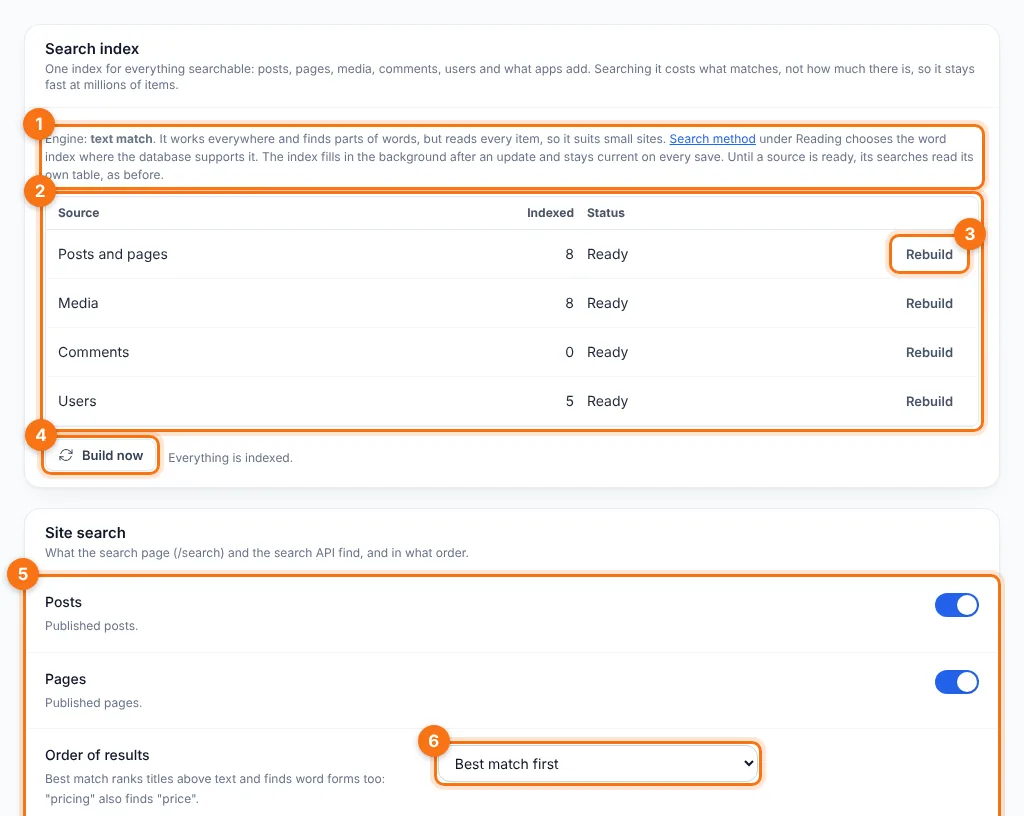
- The engine in use. This screenshot is from a site using text match; on MySQL and MariaDB it normally says "word index".
- Every source, how many items are indexed and its status: Ready, or Building with progress.
- Rebuild one source from the beginning.
- Build now: index what is missing while you watch, instead of waiting for the background task.
- The content types (and app sources) the search page covers.
- The order of results: best match first, or newest first.
For apps: $this->api()->search()
Make your records searchable
Register a source in boot(). Registration is per request and costs nothing: the closures run only when the index is built or an item is re-indexed.
public function boot(): void
{
    $t = $this->table('products');
    $this->api()->search()->source('products', [
        'label'     => 'Products',
        'public'    => true,
        'documents' => fn(int $after, int $limit) => array_map([$this, 'doc'],
            $this->db()->select("SELECT * FROM {$t} WHERE id > :a ORDER BY id LIMIT {$limit}", ['a' => $after])),
        'document'  => function (int $id) use ($t) {
            $r = $this->db()->selectOne("SELECT * FROM {$t} WHERE id = :i", ['i' => $id]);
            return $r ? $this->doc($r) : null;
        },
        'count'     => fn() => (int) $this->db()->selectOne("SELECT COUNT(*) AS c FROM {$t}")['c'],
        // Searched directly until the index is built:
        'table'     => $t,
        'columns'   => ['name', 'sku', 'description'],
        // Full rows for results:
        'hydrate'   => fn(array $ids, array $opts) => $this->productsById($ids),
    ]);
}

public function doc(array $r): array
{
    return [
        'id'       => (int) $r['id'],
        'title'    => $r['name'],
        'body'     => strip_tags($r['description']),
        'keywords' => [$r['sku'], $r['brand']],
        'type'     => 'product',
        'status'   => $r['status'],
        'public'   => $r['status'] === 'live',
        'date'     => $r['created_at'],
        'url'      => '/shop/' . $r['slug'],
    ];
}
documents($after, $limit) must return documents with increasing ids greater than $after. That is how the background build pages through a source of any size and resumes where it stopped.
A document
| Key | |
|---|---|
id | Required. A positive integer, unique within the source. |
title | Shown in results and counted more than the text: a match in the title ranks higher. |
body | Plain text, up to 60,000 characters. Use it for snippets. |
keywords | A string or a list: extra words to match (SKUs, file names, tags). Separators are split for you. |
type, status | Your own sub-type and status, for scope filters. |
public | true when anyone may see the item now. Site search shows only public items. |
owner_id | The user it belongs to, if any. |
date | UTC Y-m-d H:i:s, for "newest first" and tie-breaks. |
url | Where a result links to. |
A source definition
| Key | |
|---|---|
documents | fn(int $after, int $limit): list<array>. Required for an indexed source. |
document | fn(int $id): ?array: one item, or null when it is gone (it is then removed from the index). |
count | fn(): int: how many there are, for the progress shown in Settings → Search. |
table, columns, id_column | Your table (pass $this->table('x')), the columns to search with LIKE until the index is ready, and its id column (default id). They also let searches find rows added behind your back. |
fallback | fn(SearchQuery $q, string $alias, array &$params, array $scope): string: your own SQL condition, instead of columns. |
public | true: its public items can appear on the site's search page. The administrator can switch it off in Settings → Search. |
hydrate | fn(list<int> $ids, array $opts): array<int, array>: full rows for results, keyed by id. $opts['public'] is true for site search: return only what anyone may see. |
weight | Relevance multiplier in mixed results (default 1.0). |
batch | Items per background step (default 500). |
version | Bump it when your documents change shape: the source is rebuilt in the background. |
search | fn(SearchQuery $q, array $opts): list<array>, for a callback source instead of documents. |
Keep it current
$search = $this->api()->search();
$search->touch('products', $id);      // after a save: re-reads document($id)
$search->remove('products', $id);     // after a delete
$search->put('products', $doc);       // index a document you built yourself
$search->rebuild('products');         // start over in the background
$search->purge('products');           // in onUninstall(): take it out of the index
$search->ready('products');           // whether the index is complete
None of these throws. A failed write is logged and retried by the next background run, so a search problem never stops your save.
Search your own table
constrain() returns an SQL condition for your own query. It uses the index once it is ready, and your columns until then:
$params = [];
$where = $this->api()->search()->constrain('products', $q, 'p', $params);
$rows = $this->db()->select(
    "SELECT p.* FROM {$t} p WHERE p.status = 'live' AND {$where}
     ORDER BY p.created_at DESC LIMIT 20", $params);
$total = (int) $this->db()->selectOne("SELECT COUNT(*) AS c FROM {$t} p WHERE p.status = 'live' AND {$where}", $params)['c'];
The third argument is your table's alias ('' for none). A blank query gives 1=1, and one that can't match anything gives 1=0. Within one request, the match is worked out once and reused, so the rows and the total don't search twice.
Ranked results
$r = $this->api()->search()->query('blue shirt', [
    'sources'  => ['products'],   // default: this app's sources
    'page'     => 1,
    'per_page' => 10,             // at most 100
    'sort'     => 'relevance',    // or 'newest'
    'public'   => true,           // only items anyone may see
]);

foreach ($r['items'] as $it) {
    echo '<a href="' . htmlspecialchars((string) $it['url']) . '">' . $it['title_html'] . '</a>';
    echo '<p>' . $it['snippet'] . '</p>';
}
// $r['total'], $r['page'], $r['last_page']
Each item has source, id, score, title, title_html and snippet (escaped HTML with the matches in <mark>: print them as they are), url, date, type, status and item (your hydrated row).
Narrow with stored fields: type, status, owner_id, or source_types to limit one source's types (['content' => ['post']]). stem turns word forms on or off; it is on for public searches.
Core's sources can be searched too: 'sources' => ['content', 'media']. This needs the matching read permission (posts.read, media.read, comments.read or users.read), except with 'public' => true. Your own sources need no permission. See App permissions.
In-memory lists
A short list that lives in PHP (tools, help topics) doesn't need an index. Register a callback source; it is searched on each request:
use App\Core\Search\SearchQuery;

$this->api()->search()->source('tools', [
    'label'  => 'Tools',
    'public' => true,
    'search' => fn(SearchQuery $q, array $opts) => array_values(array_map(
        fn($t) => ['id' => $t['id'], 'title' => $t['name'], 'body' => $t['description'], 'url' => $t['url']],
        array_filter($this->tools(), fn($t) => $q->matches($t['name'] . ' ' . $t['description'])))),
]);
$this->api()->search()->parse($q)->matches($text) applies the same rules anywhere: every word, phrases, exclusions.
Content types
Items of a content type your app registers are searched with posts and pages, through the content source, with nothing to do. Published items appear in site search unless you register the type with 'searchable' => false (or 'public' => false). Administrators choose the types the search page covers in Settings → Search.
For themes
templates/search.php receives:
| Variable | |
|---|---|
$posts | Post rows, as always, best match first. Each also has search_snippet (the matching passage) and search_title (the title), as escaped HTML with <mark>. |
$results | Every result, apps' included: source, title, title_html, url, snippet, date, item. |
$meta | total, page, last_page, per_page. |
$query | What was typed. |
<?php foreach ($posts as $p): ?>
  <article>
    <h2><a href="<?= $base . htmlspecialchars(\App\Core\Helpers::postUrl($p)) ?>"><?= $p['search_title'] ?? htmlspecialchars($p['title']) ?></a></h2>
    <?php if (!empty($p['search_snippet'])): ?><p><?= $p['search_snippet'] ?></p><?php endif; ?>
  </article>
<?php endforeach; ?>
A theme that shows only $posts keeps working, without app results. Style the highlights with mark. See Theme reference.
A custom engine
An engine implements App\Core\Search\Engine\SearchEngine: storing documents (put, remove, purge, count, maxId), answering list queries (constrain, matchSql) and ranked searches (search). Return it from the filter:
$this->addFilter('search.engine', fn($engine) => new MySearchServerEngine($engine));An engine with no SQL of its own can answer constrain() with "{$idExpr} IN (…ids it found…)", capped at a sensible number, and return null from matchSql(). Core uses it only if available() returns true; otherwise the built-in engine stays.
Performance
Measured on MariaDB 11.4.5 with 1,000,000 posts of 60 to 140 words each, a 1 GB InnoDB buffer pool and two CPU cores. Each figure is the median of five runs, each a fresh request.
| Search | Matches | Admin list (20 rows + total) | Site search (10 rows + total) |
|---|---|---|---|
kubernetes (rare word) | 181 | 9 ms | 3 ms |
droplet pricing (two words) | 79 | 16 ms | 11 ms |
"pricing droplet" (phrase) | 41 | 21 ms | 16 ms |
the backup (stopword + word) | 5,993 | 218 ms | 203 ms |
pricing (in 2% of posts) | 19,862 | 301 ms | 260 ms |
ai pricing (2-letter word + word) | 189 | 426 ms | 402 ms |
server (in 5% of posts) | 50,091 | 7.1 s | 3.0 s |
Before 1.2.92, a text search of the same million posts took about 35 seconds for any query. Indexing runs at about 1,500 items a second in bulk, and re-indexing one saved item takes about a millisecond.
What sets the cost is how many items match, not how many there are. The database spends roughly 30–50 µs on each matching item, so one word found in tens of thousands of items still takes seconds. For sites where those searches must be instant too, plug in a dedicated search server through the engine filter.
Limits
- Words match from their start:
oceanfinds "Oceanic", but not "Bioceanic". Joined names such as "DigitalOcean" are split when indexed, sooceanfinds those. The text-match engine matches anywhere in a word, at the cost of reading every row. - Languages written without spaces (Chinese, Japanese, Thai) are split by the database at spaces only. Use the text-match engine for those sites.
- Indexed sources need positive integer ids. Lists keyed by strings fit a callback source.
- The index holds a plain-text copy of what is searchable, in the same database: roughly the size of your posts' text, plus media details, comments and users' names and email addresses (for the Users list).
Related
- Data tables: the admin lists that search through
constrain(). - App development and App development best practices.
- App permissions, Theme reference.
Leave a comment