
Publish from a script with the REST API
 Asif Mughal
7 min read
Asif Mughal
7 min read
In this tutorial you'll write a script that publishes a Markdown file from your computer to a Basehim site. Run it once and it creates the post, with its category and a cover image. Run it again after editing the file and it updates the same post. It's the core of a "write in your editor, publish from the terminal" workflow, or of a CI job that publishes release notes.
You'll learn to:
- create a scoped API key;
- send JSON and file uploads;
- find or create a category;
- tell create from update;
- handle API errors.
You need: Node.js 18 or newer (for built-in fetch), and a Basehim site where you can create an API key. The script has no dependencies.
Step 1: Create an API key
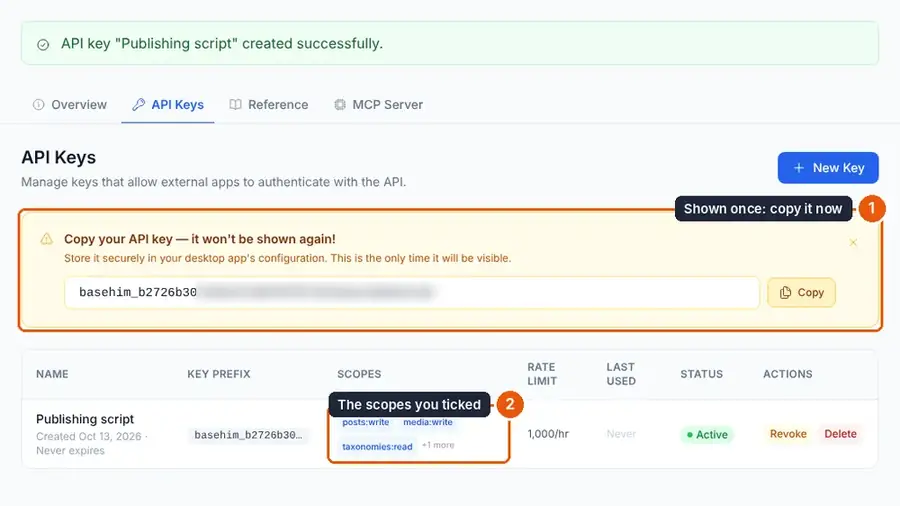
In the admin, open API → Keys and create a key named "Publishing script" with these scopes:
| Scope | Used for |
|---|---|
posts:write | Creating and updating posts (includes reading them) |
media:write | Uploading the cover image |
taxonomies:read, taxonomies:write | Finding and creating the category |
Copy the key, which starts with basehim_. It's shown only once. The key acts as your account, limited to these scopes, so the script can publish only if your role can.
Keep the key out of the script and out of git. Pass it in the environment:
export BASEHIM_URL=https://your-site.com
export BASEHIM_KEY=basehim_…
Step 2: Write a post as Markdown
posts/release-2-4.md:
---
title: Release 2.4
excerpt: Faster search and a new export button.
category: Release notes
status: draft
cover: cover.png
cover_alt: The 2.4 release banner
---
## What changed

- Search is **twice as fast** on large sites.
- A new **Export** button on every report.

Thanks to everyone who sent feedback.
Put a cover.png next to it. The front matter between the --- lines becomes the post's fields. Always send an excerpt: it's what cards, feeds and search results show.
Step 3: A small API helper
Create publish.mjs and start with one function that every call goes through:
// Publish a Markdown file to Basehim.   node publish.mjs posts/release-2-4.md
// Needs Node 18+ and two environment variables: BASEHIM_URL and BASEHIM_KEY.
import { readFile, writeFile } from 'node:fs/promises';
import path from 'node:path';

const SITE = process.env.BASEHIM_URL;     // https://your-site.com
const KEY = process.env.BASEHIM_KEY;      // basehim_… with posts:write, media:write, taxonomies:read, taxonomies:write
const STATE = '.published.json';          // remembers which file became which post id

async function api(method, route, body) {
  const isForm = body instanceof FormData;
  const res = await fetch(`${SITE}/api/v1${route}`, {
    method,
    headers: {
      Authorization: `Bearer ${KEY}`,
      Accept: 'application/json',
      ...(body && !isForm ? { 'Content-Type': 'application/json' } : {}),
    },
    body: body === undefined ? undefined : (isForm ? body : JSON.stringify(body)),
  });
  const json = await res.json().catch(() => ({}));
  if (!res.ok) throw new Error(`${method} ${route} → ${res.status}: ${json.detail ?? json.error ?? 'request failed'}`);
  return json;
}- JSON bodies get
Content-Type: application/json. For uploads,fetchsets the multipart content type itself when the body is aFormData. - Errors: authentication and scope problems come back as problem details with a
detailfield. Other errors have anerrorfield. The helper reads either and throws, so one failed call stops the script with a clear message.
Step 4: Parse the file
// "---\nkey: value\n---\nbody" → { meta, body }
function parse(text) {
  const m = text.match(/^---\n([\s\S]*?)\n---\n([\s\S]*)$/);
  if (!m) throw new Error('The file needs front matter between --- lines.');
  const meta = Object.fromEntries(m[1].split('\n')
    .map((line) => line.match(/^(\w+):\s*(.*)$/)).filter(Boolean).map(([, k, v]) => [k, v.trim()]));
  return { meta, body: m[2].trim() + '\n' };
}
This simple parser handles flat key: value lines, which is all this script needs.
Step 5: Category and cover image
async function categoryId(name) {
  const { data } = await api('GET', '/taxonomies/category/terms');
  const found = data.find((t) => t.name.toLowerCase() === name.toLowerCase());
  if (found) return found.id;
  return (await api('POST', '/taxonomies/category/terms', { name })).data.id;
}

async function uploadImage(file, alt) {
  const form = new FormData();
  form.append('file', new Blob([await readFile(file)]), path.basename(file));
  form.append('alt_text', alt ?? '');
  return (await api('POST', '/media', form)).data.id;
}
Basehim makes the thumbnail, medium and large sizes of the upload automatically. Always send alt_text: it's used for accessibility and for the image's social-card description.
Step 6: Create or update
The API reads single posts by slug but changes them by id. Drafts aren't readable by slug, so the script keeps a small .published.json file that maps each Markdown file to its post id:
const file = process.argv[2];
if (!SITE || !KEY || !file) {
  console.error('Usage: BASEHIM_URL=… BASEHIM_KEY=… node publish.mjs path/to/post.md');
  process.exit(1);
}

const { meta, body } = parse(await readFile(file, 'utf8'));
const state = JSON.parse(await readFile(STATE, 'utf8').catch(() => '{}'));

const payload = {
  title: meta.title,
  content: body,
  content_format: 'markdown',
  excerpt: meta.excerpt ?? '',
  status: meta.status ?? 'draft',
};
if (meta.category) payload.term_ids = [await categoryId(meta.category)];

let post;
if (state[file]) {
  post = (await api('PATCH', `/posts/${state[file]}`, payload)).data;          // update by id
  console.log(`Updated #${post.id} (${post.status})`);
} else {
  if (meta.cover) payload.featured_media_id = await uploadImage(path.join(path.dirname(file), meta.cover), meta.cover_alt);
  post = (await api('POST', '/posts', payload)).data;
  state[file] = post.id;
  await writeFile(STATE, JSON.stringify(state, null, 2));
  console.log(`Created #${post.id} "${post.title}" (${post.status})`);
}
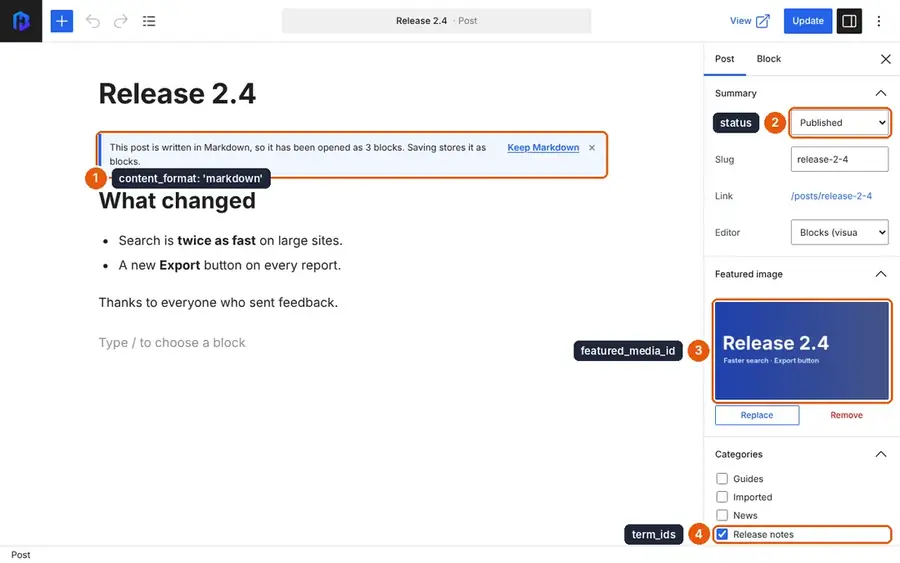
content_format: 'markdown'stores the Markdown as it is. The site renders it, and the editor opens it as blocks if someone edits it in the admin.term_idsreplaces the post's categories and tags with exactly this list.PATCHchanges only the fields you send, so nothing else on the post is touched.- The cover is uploaded only when the post is created, so re-running doesn't fill the media library with copies.
Step 7: Run it
node publish.mjs posts/release-2-4.md
# Created #115 "Release 2.4" (draft)
Open the admin. The draft is there, with its category and featured image.
Now change status: draft to status: published in the file and run it again:
node publish.mjs posts/release-2-4.md
# Updated #115 (published)

curl -s "$BASEHIM_URL/api/v1/posts/release-2-4"
# {"data": {"id": 115, "status": "published", "excerpt": "Faster search and a new export button.", "terms": [{"name": "Release notes", …}], …}}
Try a wrong key to see the error handling:
BASEHIM_KEY=basehim_wrong node publish.mjs posts/release-2-4.md
# Error: PATCH /posts/115 → 401: Authentication required.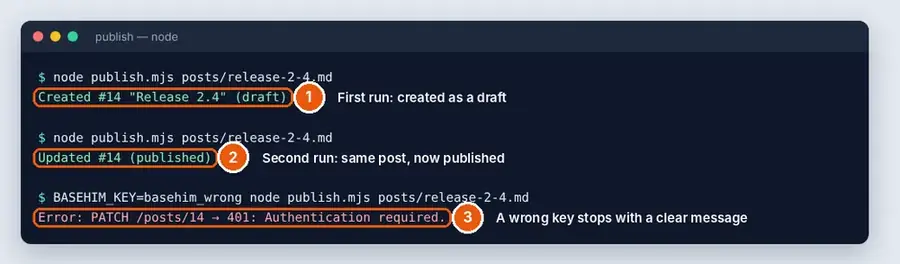
What can go wrong
| Message | Cause |
|---|---|
401: Authentication required. | Wrong or revoked key, or the server strips the Authorization header (see Installation) |
403: This API key does not have the media:write scope. | Add the scope to the key, or create a new key |
The status comes back pending instead of published | Your role can't publish, so the post waits for an editor's review. Updating a post that is already published then fails with 403: Requires the publish_posts capability. |
A warnings array in the response | Your role lacks unfiltered_html, and raw HTML in the Markdown was filtered |
404 on PATCH | The post was deleted. Remove its line from .published.json |
Taking it further
- Publish a whole folder: loop over
posts/*.md. - Run it in CI on every push to a
content/folder, with the key stored as a CI secret. - Schedule posts for later by keeping them as drafts and changing
statuswhen it's time.
The same calls in curl, PHP and Python are in the REST API guide, and every endpoint is in the API reference.
Leave a comment